ConstructionOnline has introduced two powerful new capabilities designed to help construction companies better track, manage, and apply labor costs across the full project lifecycle: Pay Rates for Time Tracking and Labor Expenses for OnCost™ Purchasing.
Together, these connected enhancements create a more complete labor-cost workflow within ConstructionOnline—linking recorded time, employee pay rates, project expenses, estimate budgets, invoicing, and accounting into one streamlined system.
For construction teams, labor is one of the most important—and often most difficult—cost categories to manage accurately. With the addition of Pay Rates and Labor Expenses, ConstructionOnline gives companies new tools to calculate labor costs from time entries, convert those costs into purchasing records, and carry labor cost information forward into project financials.
Pay Rates Bring Labor Cost Visibility to Time Tracking
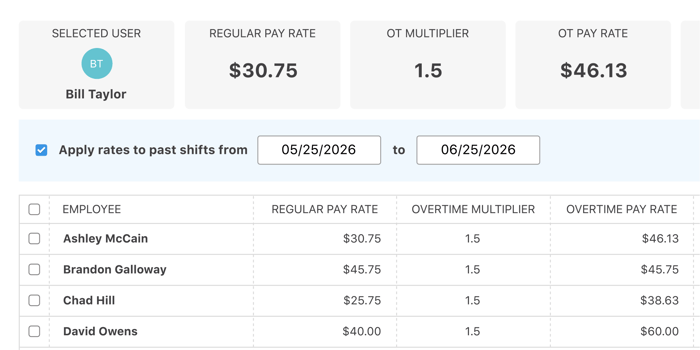
With the release of Pay Rates for Time Tracking, companies can now define pay rates for individual Company Users, making it possible to calculate labor costs directly from recorded Time Tracking Shifts.
Each employee can be assigned a default Pay Rate, Overtime Multiplier, and Overtime Rate. Companies can also establish unique rates for specific Cost Codes, allowing labor costs to more accurately reflect the type of work being performed.
When a Cost Code-specific rate is available, ConstructionOnline applies that rate to the corresponding shift. When no matching Cost Code rate is assigned, the employee’s default rate is used instead.
This flexibility gives construction companies a more accurate way to account for labor costs across different types of work, helping ensure time entries translate into meaningful project cost data.
Flexible Rate Management for Construction Teams
Pay Rates can be managed from both Time Tracking Settings and individual Contact Details, giving authorized users convenient access to employee rate information from multiple areas of ConstructionOnline.
Additional Pay Rate tools allow companies to copy a complete Pay Rate structure from one employee to another, apply current Pay Rates retroactively to past shifts, and control which Cost Codes are available to individual employees when clocking in.
Dedicated permissions also allow companies to determine who can view and manage employee Pay Rates, helping protect sensitive labor cost information while supporting the needs of project managers, administrators, accounting teams, and other authorized users.
Once applied, labor cost information is available across key Time Tracking outputs, including the Time Summary view, Project Time Summary Reports, Employee Time Summary Reports, Company Time Summary Reports, and related Excel exports.
Labor Expenses Expand Purchasing
ConstructionOnline has also introduced Labor Expenses as a new record type within OnCost Purchasing, available alongside Purchase Orders, Expenses, Bills, Receipts, and Payments.
Labor Expenses can be created directly from recorded Time Tracking Shifts, allowing companies to filter labor by Date Range, Project, Cost Code, and Employee before generating project-level expense records. Depending on reporting and accounting needs, labor can be organized as a single line item, grouped by Cost Code, or separated by Employee.
For labor costs that do not originate in ConstructionOnline's Time Tracking, Labor Expenses may also be created manually. This provides flexibility for subcontracted crews, outside payroll, projected labor expenses, or other labor-related costs that need to be tracked within project financials.
Connecting Labor Costs to Project Budgets
Labor Expense items can be linked directly to estimate Categories, Subcategories, and Line Items, helping teams carry actual labor costs into the broader project budget.
A new Labor Expense Cost column provides visibility within Estimating, while unlinked labor costs are included in Unlinked Purchasing Totals. Users can also open related Labor Expense records directly from linked Estimate values, making it easier to review, verify, and manage labor cost activity from within project financial workflows.
This connection gives construction teams a clearer understanding of how labor costs impact project performance, improving visibility from the original estimate through purchasing, billing, and financial reporting.
Supporting Bills, Payments, Invoices, and Accounting
Labor Expenses are designed to support downstream financial workflows across ConstructionOnline.
From Labor Expense records, teams can create Bills using remaining, percentage-based, or custom billing amounts. Users can also record Payments, mark Labor Expenses as paid, and invoice billable Labor Expense line items.
For companies using QuickBooks Online, related Bills, Payments, and Receipts can also be synchronized, helping maintain continuity between ConstructionOnline project financials and accounting workflows.
A Connected Labor-Cost Lifecycle
Individually, Pay Rates and Labor Expenses each provide important new functionality for construction teams. Together, they create a connected labor-cost lifecycle that helps close the gap between time worked, cost incurred, project budget impact, and financial follow-through.
Recorded shifts can now calculate labor costs using Employee-specific and Cost Code-specific Pay Rates. Those labor costs can then be brought into OnCost Purchasing as Labor Expenses, linked to the project Estimate, included in project financial tracking, invoiced when billable, and carried into accounting workflows.
This release represents a major step forward in ConstructionOnline’s continued investment in connected financial management—helping construction professionals improve cost visibility, reduce manual data entry, and make more informed decisions throughout every stage of the project lifecycle.